The Tom framework
A Dart/Flutter enterprise & AI ecosystem — explore every module and component, what it does, and how far along it is.
released
published
in the works
not started
What Tom is
The Tom framework is a Dart/Flutter ecosystem for building uniform enterprise applications — and for generating their business logic with AI. A Tom application is a Flutter client and a Dart server joined by a typed interface, with the server reaching external services and an application-owned MySQL/PostgreSQL database. Both halves are built on Tom Core, so every app gets the same guarantees by construction: a resource-driven configurable UI, full internationalization, uniform authentication and a four-state authorization system, one architecture, and uniform deployment, operations, and provisioning — regardless of how its business logic was written.
That business logic is produced by a staged, AI-assisted flow — manual specification → DocSpec → CodeSpec → implementation
— orchestrated by ai_build, which scripts the steps on tom_flow, draws on
tom_brain for the AI work through external interfaces, and executes dynamic, sandboxed code through
D4rt. tom_reflection provides the runtime reflection that lets an application assemble itself. The same architecture can also host AI-generated agents: a server can expose
tom_brain as a service whose agent surfaces run inside the Flutter client via tom_d4rt_flutter.
The seven building blocks
Tom is organised into seven areas. Five provide runtime and authoring capabilities, one is the AI cognition, and one is the process that creates applications.
- Reflection — the base technology for runtime introspection and analyzer-based
API extraction. It lets applications assemble themselves at runtime and lets tools read a codebase's API without re-running the analyzer.
- D4rt Interpreter — a sandboxed Dart interpreter family that runs and generates
code at runtime, with an analyzer-based line and an analyzer-free line sharing one bridge API. It is the dynamic-execution engine beneath Tom's scripting, creation flow, and agentic UI.
- Tom Brain Agent — the intelligence layer: an OpenAI-format server that runs
D4rt procedures over a self-organising, dreaming graph memory, turning a language model into a process that produces answers rather than just tokens, bound to a user-dedicated assistant persona.
- Docspecs/Codespecs Software Factory — the staged, AI-assisted process that
turns an idea into specified, generated, tested code, with full traceability from a requirement through DocSpec and CodeSpec to its implementation and test.
- Build tools — the command-line machinery that builds, tests, documents, and
deploys the framework and its applications, all built on the shared tom_build_base CLI foundation.
- Core Application Framework — the client+server foundation every Tom app is
built on, over a shared kernel and the tom_basics floor. It is what enforces the cross-cutting uniformity described above.
- VS Code Extension and VS Code Scripting — Dart-first editor automation: a
TypeScript extension hosts a Dart bridge so framework tooling runs in Dart through D4rt with full VS Code API access.
How a Tom application is built
A Tom application is a client+server pair on Tom Core, and its business logic is produced by the DocSpec/CodeSpec Software Factory and authored in Tom Forge. Three views tell the story: the anatomy of the running application, the spec-to-code flow that derives it, and the development environment that drives that flow.
Anatomy of a Tom application
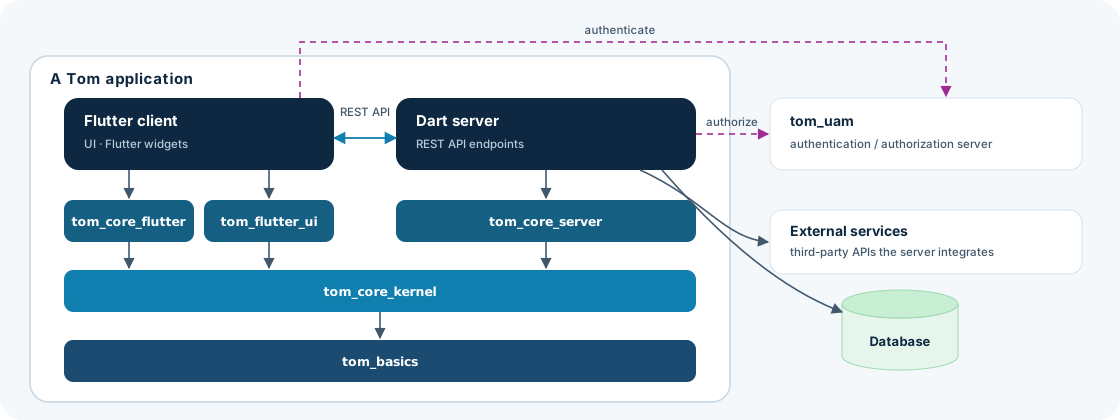
A Tom application is a Flutter client and a Dart server that talk over a REST API. Its whole framework stack lives
inside the application: the client is built on tom_core_flutter and the
tom_flutter_ui widget layer, the server on tom_core_server, all three rest on the shared
tom_core_kernel, and that in turn stands on the tom_basics floor — so both halves share one type system and the same cross-cutting guarantees.
Outside the application sit only the things it talks to at runtime: its own database, any
external services the server integrates, and the tom_uam
authentication/authorization server that issues and validates identities.
DocSpec/CodeSpec-driven development
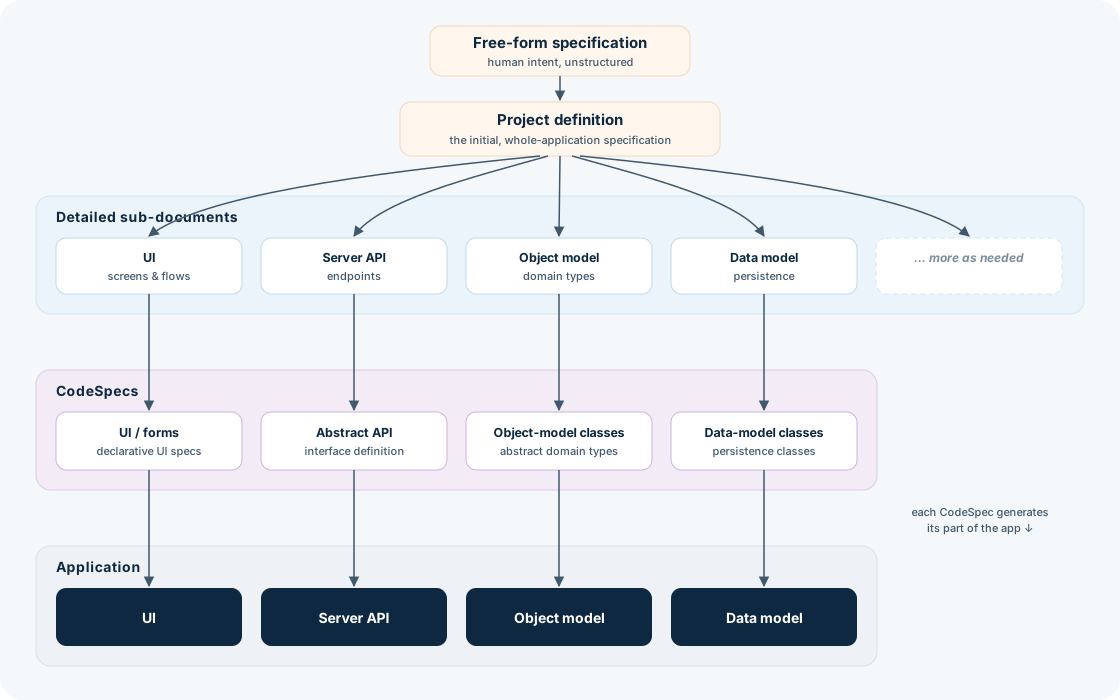
The application's four facets — its UI, server API, object model, and data model — are not hand-written from scratch but derived. A free-form specification is distilled into a project definition (the initial, whole-application spec), which fans out into detailed sub-documents, one per facet the application needs — and as many more as it calls for. Each sub-document drives a matching CodeSpec — UI/forms, the abstract API definition, the abstract object-model classes, and the data-model classes — and each CodeSpec in turn generates the corresponding part of the running application. The chain keeps every generated artifact traceable back to the document, and ultimately the requirement, that produced it.
The development environment
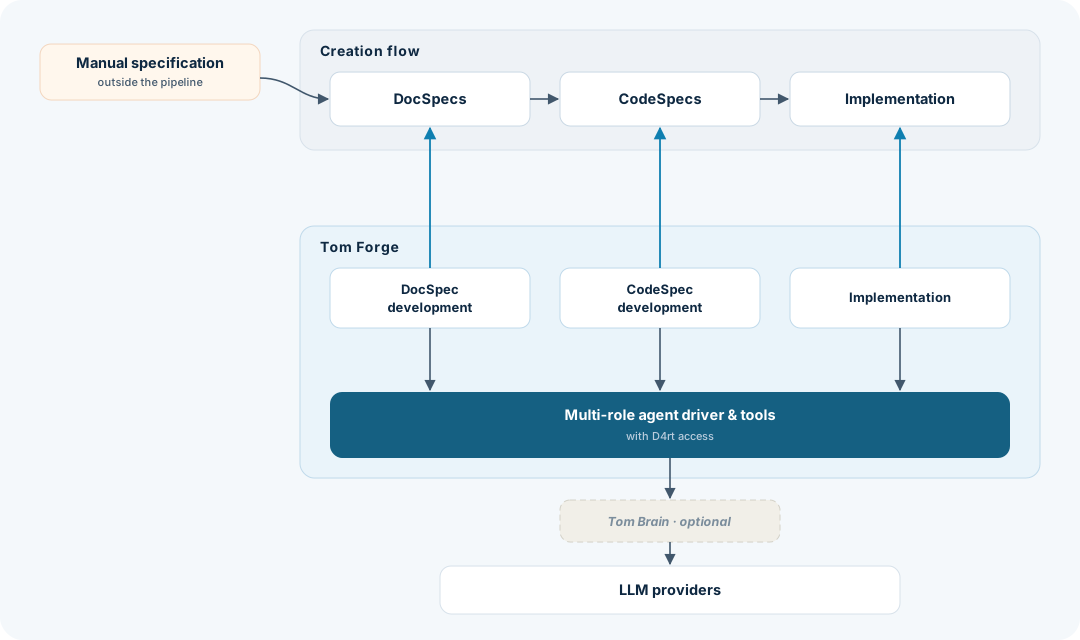
Day to day, the creation flow simplifies to three stages — DocSpecs → CodeSpecs → Implementation — seeded by a manual specification that sits outside the automated pipeline. Tom Forge is the environment that drives those stages: it pairs each stage with a development surface (DocSpec development, CodeSpec development, Implementation), all of which run on a shared multi-role agent driver and tool set with D4rt access. That driver is what reaches out to the LLM providers; when richer, memory-backed cognition is wanted, Tom Brain can sit optionally between the driver and the raw providers.
Areas
Start with an area — the big picture — then drill into its components and modules.
Reflection
D4rt Interpreter
Tom Brain Agent
Docspecs/Codespecs Software Factory
Build tools
Core Application Framework
VS Code Extension and VS Code Scripting
Components
Each component is a family of modules — hover for its status mix, click to open its modules.